
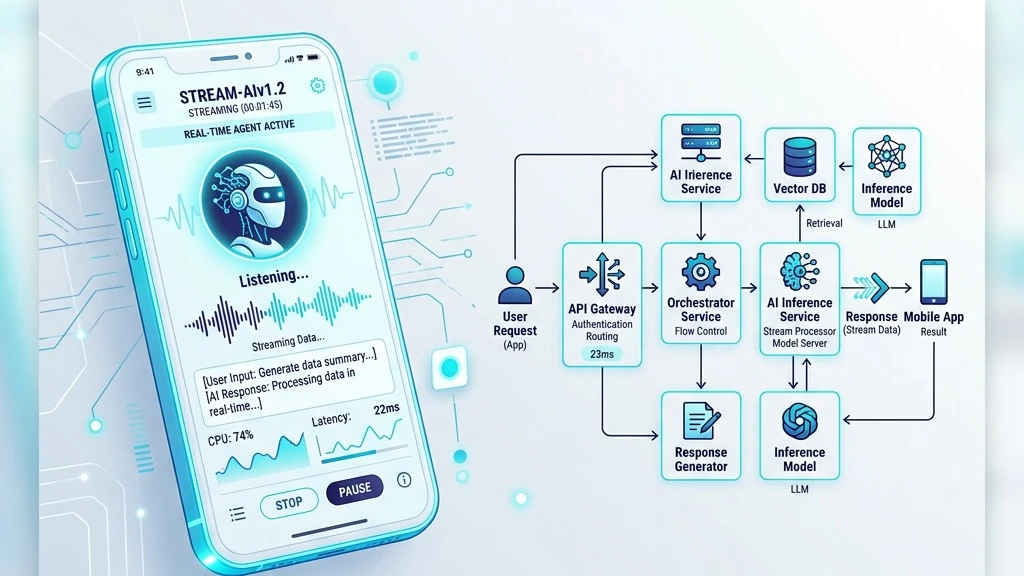
The Mobile AI Challenge: Speed, Threads, and Battery
Adding an interactive AI agent or conversational copilot to a mobile app sounds simple on paper: call an API endpoint, parse JSON, update the UI.
In practice, mobile environments are brutal testing grounds. Unlike desktop browser web apps running over high-speed fiber or Wi-Fi with dedicated multi-core CPUs, mobile devices frequently operate on fluctuating 4G/5G connections, suffer severe CPU throttling under heat or low battery, and enforce strict main-thread rendering deadlines (16.6ms for 60fps, 8.3ms for 120fps display refresh rates).
If your AI agent API call blocks the main UI thread or takes 4 seconds to return a complete payload without token streaming, mobile users will assume your app is frozen and churn.
Over the past year, our team at Quantum Bases has integrated AI agents into multiple production iOS and Android applications. Here is the exact architectural blueprint we use to achieve sub-500ms initial response times, smooth streaming animations, and 99.9% network resilience.
1. Decouple Transport: Streaming SSE/WebSockets over Standard REST
The biggest beginner mistake in mobile AI development is relying on traditional request-response REST endpoints (POST /api/chat). Waiting for the full model response payload to generate before returning JSON to the mobile device introduces unacceptable latency (often 3 to 10 seconds).
The Solution: Server-Sent Events (SSE) or WebSockets with Binary Chunking
For mobile applications, Server-Sent Events (SSE) or persistent WebSockets are mandatory.
Mobile SSE Pipeline Architecture:
2. Thread Hygiene: Keeping 60 FPS Smooth During Token Ingestion
When an LLM stream pushes 20–50 tokens per second, naive state management (like calling setState() in React Native or triggering SwiftUI ObservableObject invalidation on every raw token byte) forces continuous layout recalculations on the main UI thread. This causes visible micro-stuttering and UI freezing.
// WRONG: Triggering UI recomposition on every raw token
sseStream.collect { rawToken ->
    _uiState.value = _uiState.value + rawToken // Triggers 50 UI updates/sec!
}
// CORRECT: Batching tokens off the main thread with timed buffer release
private val tokenBuffer = StringBuilder()
sseStream
    .buffer()
    .sample(33.milliseconds) // Throttle UI recomposition to 30 FPS max
    .collectOnMainThread { tokenChunk ->
        tokenBuffer.append(tokenChunk)
        _uiState.value = tokenBuffer.toString()
    }
3. Edge Resilience & Offline Graceful Fallbacks
Mobile network connections switch between 5G, LTE, and dead zones seamlessly as users move. A reliable mobile AI integration must gracefully handle sudden packet loss, connection drops, and API timeout spikes without losing conversation context.
- Optimistic State & Local Queue: Store draft user prompts in a local encrypted SQLite / Realm database before transmission. If network fails mid-stream, re-establish the stream automatically with a
Last-Event-IDheader resume token. - Local Fallback Intent Classifier: For basic action triggers (e.g., "Open Settings", "Show my last invoice"), run a lightweight on-device classifier (e.g., Apple MLX or ONNX Runtime mobile) so navigation commands work even while offline.
- Aggressive Caching & Token Management: Cache static agent prompt templates and common query embeddings on-device to minimize round-trip API context payloads.
4. End-to-End Automated Testing for Non-Deterministic Agents
Testing mobile AI agents is notoriously difficult because LLM responses are non-deterministic. Traditional static assertion tests (assert(response == "Hello")) fail regularly.
To ensure production reliability, implement a 3-tier testing strategy:
- 1. Deterministic Mock Server Suite: Mock the SSE/WebSocket server using predefined byte stream fixtures to test UI layout edge cases, text wrapping, code block rendering, and network dropouts.
- 2. Semantic Similarity Assertions: Use semantic embeddings (e.g., Cosine similarity score > 0.85) in automated XCTest / Espresso runs to verify AI tool invocation payloads without checking exact word-for-word string matches.
- 3. Latency & Memory Leak Diagnostics: Measure memory usage during extended 30-minute streaming sessions to ensure token buffers are cleared and WebSocket listeners don't leak memory callbacks.
Need Help Integrating AI Into Your Mobile App?
Building an AI agent is only 20% of the effort; integrating it into a high-performance iOS/Android mobile app with sub-second latency and rock-solid edge resilience is the real challenge.
At Quantum Bases, we specialize in mobile AI agent engineering, custom streaming APIs, and end-to-end performance optimization. Contact our senior engineering team to get your mobile AI feature audited or built.